
An online vehicle reservation system is a digital platform that lets customers browse, select, and confirm a vehicle booking in minutes without visiting a physical location. Understanding how online vehicle reservation works gives you a clear advantage: you pay less, waste no time, and arrive at pickup fully prepared. Platforms like Sixt, Autycloud, and CarsDirect have built these systems to handle everything from live inventory checks to instant payment processing. Well-designed systems complete bookings in 3 to 5 minutes on any device, with confirmation sent immediately to your inbox. That speed is not accidental. It reflects years of engineering focused on reducing friction at every step of the online car booking process.
How does the online vehicle booking process work, step by step?
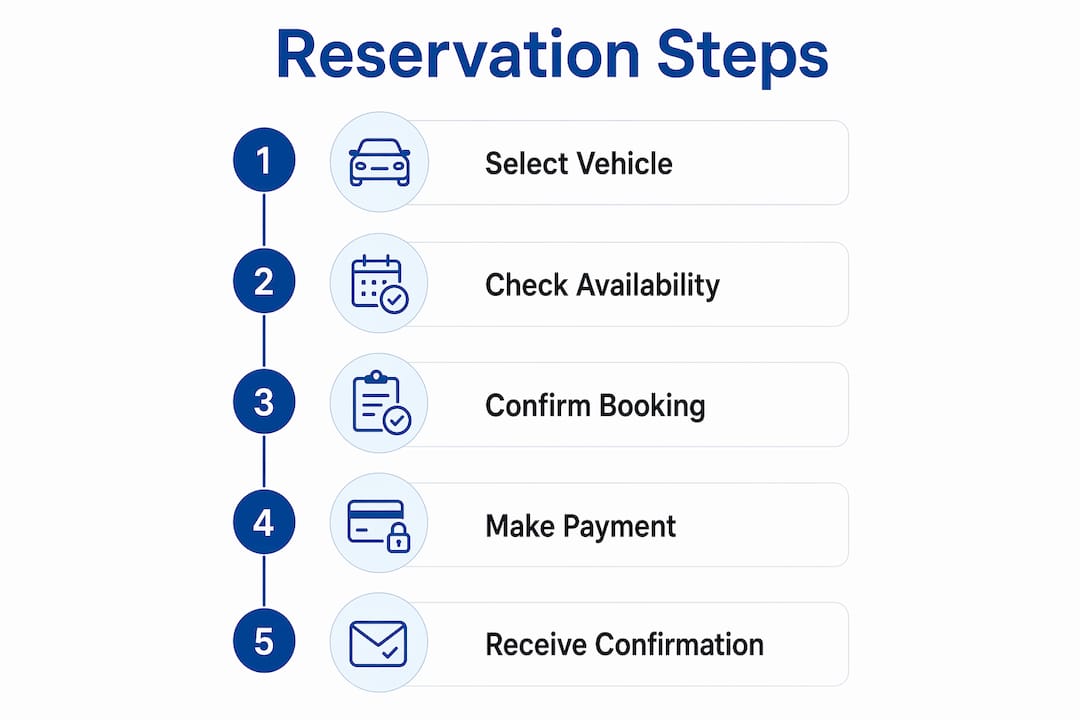
The online car booking process follows a clear sequence that most platforms have standardized. Knowing each step before you start prevents errors that cost money or cause delays at pickup.
-
Select your pickup location and dates. Most platforms ask for a pickup location, return location, and rental window first. This filters the inventory to only what is actually available for your timeframe. Some platforms like Sixt also let you choose between airport and city center locations, which affects both price and vehicle selection.
-
Choose your vehicle category and review pricing. After entering your dates, you see a list of available vehicles sorted by category: economy, SUV, luxury, convertible. Each listing shows a daily rate and total cost. Read this carefully because the headline rate rarely reflects the final price once taxes, fees, and optional add-ons are included.
-
Enter driver information and payment details. This step captures your name, driver's license number, date of birth, and contact information. Payment details are entered here as well. Most platforms process payments through providers like Stripe or PayPal, which handle deposit collection, final charges, and any refunds automatically.
-
Review and confirm the booking. Before finalizing, you see a summary of all charges, insurance options, and rental terms. This is the most skipped step and the most consequential. Travelers consistently underestimate the importance of checking final booking details and insurance documentation before confirming.
-
Receive instant confirmation. After payment, the system sends a confirmation email containing your rental agreement, payment receipt, and pickup directions. Save this document. You will need it at the counter.
Pro Tip: Book premium categories like convertibles at least 24 hours in advance. Many platforms enforce a minimum booking lead time for specialty vehicles, and prices become binding only after confirmation is issued.
For a broader look at how digital car buying has changed in 2026, the shift toward fully online transactions follows the same logic as vehicle reservations.

How do vehicle reservation systems manage availability and prevent conflicts?
The backend of any vehicle reservation system is where the real complexity lives. What looks like a simple calendar to the user is actually a live inventory engine running continuous checks.
-
Live inventory synchronization. Every booking updates the central database in real time. When one user confirms a reservation, that vehicle disappears from availability for all other users simultaneously. This prevents two customers from booking the same car for the same period.
-
Buffer time between rentals. Buffer windows between bookings are built into the system to allow for cleaning, inspections, and fueling. A vehicle returned at 10 a.m. may not show as available until noon. This is why a car that appears available on one date might show as unavailable for a pickup just a few hours later.
-
Conflict detection algorithms. Modern systems run automated checks that flag overlapping reservations before they are confirmed. If a conflict is detected, the system either rejects the booking or offers an alternative vehicle.
-
Multi-location and category support. Fleet management systems track vehicles across multiple branches and vehicle classes. A luxury sedan at one location does not affect the inventory count at another, keeping availability data accurate across the entire network.
| System feature | What it does for the customer |
|---|---|
| Live inventory sync | Shows only genuinely available vehicles in real time |
| Buffer time windows | Prevents receiving a vehicle that has not been inspected |
| Conflict detection | Eliminates double-booking errors before confirmation |
| Multi-location tracking | Accurate availability across all pickup points |
Buffer times can cause confusion. If you see a vehicle available on Tuesday and Wednesday but not Monday, a buffer window from a prior rental is likely the reason. Calling the branch directly often resolves this.
What payment and deposit policies apply to online vehicle reservations?
Payment structure is where most booking surprises originate. Understanding the full cost picture before you confirm protects your budget.
Rental companies typically collect a deposit of 20% to 50% of the total rental cost at the time of booking. The remaining balance is charged either 24 to 48 hours before pickup or at the rental counter. This two-stage payment structure reduces no-shows while giving customers flexibility. It also means your card is charged twice, which catches some renters off guard.
The headline rate displayed during the vehicle selection step is rarely the final price. Taxes, airport surcharges, young driver fees, and location fees stack on top of the base rate. The total cost analysis matters far more than the headline price alone, since hidden surcharges only become visible after you have committed to a booking.
| Cost element | Typical impact |
|---|---|
| Base rental rate | The advertised daily price |
| Deposit (upfront) | 20% to 50% of total rental cost |
| Young driver fee | Added for drivers under 25 |
| Airport surcharge | Applies to airport pickup locations |
| Insurance at desk | Often avoidable if pre-purchased online |
Pro Tip: Third-party car hire excess insurance purchased before your trip is a cost-effective alternative to buying coverage at the rental desk. Desk insurance can add significant daily costs that third-party policies cover for a fraction of the price.
Many rental agencies also require a physical credit card in the driver's name to place a deposit hold. Debit cards and prepaid cards are frequently rejected at pickup, even when the online booking was accepted. Confirm your card type is accepted before you arrive.
What are the most common pitfalls in online vehicle booking?
Avoiding mistakes in the steps for online vehicle booking is as valuable as knowing the steps themselves. Most problems at the rental counter trace back to decisions made during the online booking process.
-
Verify driver age requirements before booking. Age restrictions vary by company and vehicle category. Drivers under 25 often face surcharges or outright restrictions on certain vehicle classes. Check the driver age policies listed in the terms before selecting a vehicle.
-
Read the fuel and mileage policy. Some rentals include unlimited mileage; others cap it at 100 to 200 miles per day. Fuel policies range from full-to-full to prepaid fuel options. Ignoring these details leads to unexpected charges at return.
-
Print or save your confirmation and insurance documents. Digital copies on your phone are convenient but not always sufficient. Many rental agencies require original physical documents at pickup, including your driving license. A screenshot of your license is not a substitute.
-
Book online rather than walking up. Walk-up rental rates at the desk are frequently double the price of an online reservation. Booking in advance is both a convenience and a direct cost-saving strategy.
-
Review cancellation terms before confirming. Free cancellation windows vary widely. Some platforms offer full refunds up to 48 hours before pickup; others are non-refundable from the moment of confirmation. Know your flexibility before you pay.
Pro Tip: If you are booking for a young driver, cross-check the age policy on the platform and call the branch to confirm. Online systems do not always surface age restrictions prominently during the booking flow.
For readers who want to apply these same efficiency principles to purchasing rather than renting, these time-saving car buying strategies translate directly.
Key takeaways
Online vehicle reservation works best when you treat the confirmation screen as the beginning of your preparation, not the end of it.
| Point | Details |
|---|---|
| Booking speed | Well-built systems complete reservations in 3 to 5 minutes with instant confirmation. |
| Deposit structure | Expect to pay 20% to 50% upfront, with the balance due 24 to 48 hours before pickup. |
| Availability logic | Buffer times and live sync prevent conflicts but can make vehicles appear unavailable near adjacent time slots. |
| Cost transparency | The headline rate excludes taxes, surcharges, and fees. Always review the full price breakdown. |
| Document readiness | Carry original physical documents. Digital copies are rejected by many rental agencies at pickup. |
What I have learned from watching people book vehicles online
I have spent years watching customers walk into dealerships and rental counters with printouts that do not match what the system shows. The gap is almost never the platform's fault. It is almost always a terms-and-conditions problem that could have been caught in two minutes of reading.
The single most underused feature in any vehicle reservation system is the full terms page. Most users scroll past it to hit confirm. That page contains the fuel policy, the mileage cap, the cancellation window, and the insurance exclusions. Every dispute I have seen at a rental counter was seeded in that skipped page.
The other pattern I notice is that people treat the headline price as the final price. They budget for the advertised daily rate and arrive at the counter surprised by a total that is 30% higher. The fix is simple: always scroll to the total cost line before confirming. If the platform does not show a total-inclusive figure, that is a signal to look elsewhere.
Loyalty programs are also consistently overlooked. Platforms like Sixt and similar services offer members early access to discounts and rate locks that are not available to guest bookers. Signing up takes three minutes and the savings compound across multiple bookings. If you book vehicles more than twice a year, a loyalty account is not optional. It is the most direct path to consistently lower rates.
— Allen
Browse premium vehicles at Autovendorsfl in Fort Lauderdale
Autovendorsfl at Auto Vendors Inc in Fort Lauderdale applies the same clarity and efficiency you expect from a great online booking experience to the process of finding and purchasing a premium vehicle. The inventory includes Mercedes-Benz S-Class models, Lexus vehicles, and Audi A4 listings, all maintained to the highest standards of quality and presentation. Every vehicle in the Autovendorsfl catalog is backed by personalized service and expert guidance, so you are never navigating the process alone. Visit Autovendorsfl to explore current availability and connect with a specialist who can match you with the right vehicle for your needs.
FAQ
How long does an online vehicle reservation take to complete?
Most well-designed vehicle reservation systems complete bookings in 3 to 5 minutes on any device. Instant confirmation with a rental agreement and payment receipt is sent to your email immediately after payment.
What deposit is required when booking a vehicle online?
Rental companies typically collect a deposit of 20% to 50% of the total rental cost at the time of booking. The remaining balance is charged 24 to 48 hours before pickup or at the rental counter.
Can I use a debit card for an online vehicle reservation?
Many rental agencies require a physical credit card in the driver's name for the deposit hold. Debit cards and prepaid cards are frequently rejected at pickup even when accepted during the online booking step.
Why is online booking cheaper than walking up to a rental desk?
Walk-up rental rates are frequently double the price of an advance online reservation. Booking online locks in a lower rate and guarantees vehicle availability for your chosen dates.
Do I need to bring physical documents to pick up a reserved vehicle?
Yes. Many rental agencies require original physical documents, including your driving license. Digital copies stored on your phone are often rejected at the counter, so print your confirmation and carry your physical license.